Your cart is currently empty


 India
India USA ($)
Computer Skills Are Opening New Doors in Veeriampalayam Village
For many of us, using a computer, sending an email, or searching for information online is part of everyday life. But for children and families without regular access to technology, even basic digital skills can be difficult to develop.
This is the digital divide; it is the gap between people who have access to technology and the skills to use it and those who do not.
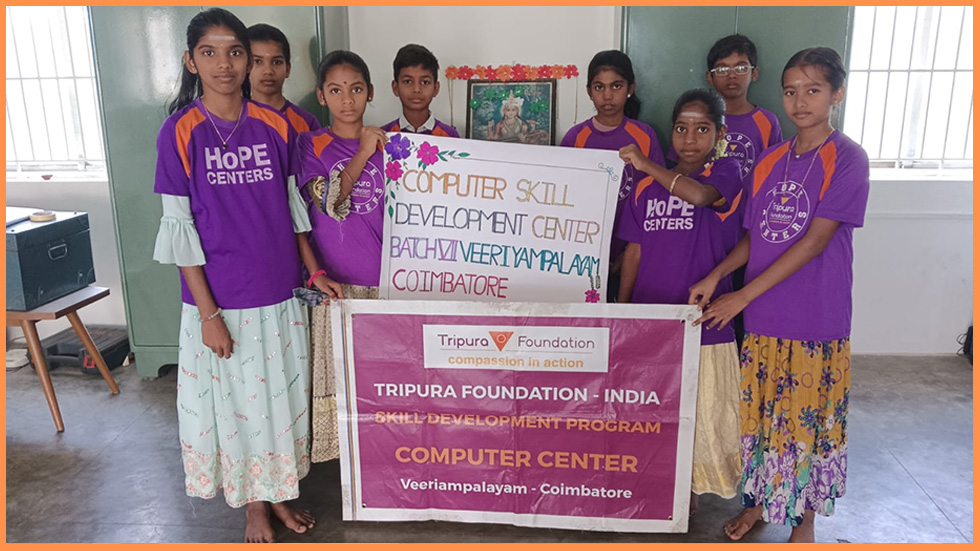
In Veeriampalayam Village in Coimbatore, Tamil Nadu, Tripura Foundation is helping bridge that gap through its Computer Skill Development Program, providing students with practical computer education that can support their learning, future employment, and participation in an increasingly digital world.
Small Classes, Practical Learning
Launched in 2023, the Computer Skill Development Program takes a personal, hands-on approach to digital literacy education.
Students learn in small batches of just 10 learners, with each group participating in a focused three-month training program. Keeping classes small allows students to receive individual attention, ask questions, and practice new skills at their own pace.
For some participants, this may be their first opportunity to regularly sit at a computer and learn how to use it with confidence.

Inside the Classroom
Students begin with the fundamentals: understanding computer hardware and software, learning how different parts of a computer work, and becoming comfortable using a keyboard.
From there, they move into practical skills they can use in school, work, and everyday life.
Students learn to:
- Use Microsoft Word to create, edit, save, and format documents.
- Work with Microsoft Excel and basic spreadsheets.
- Use keyboard shortcuts to work more efficiently.
- Find information online.
- Create and use an email account.
- Build confidence navigating a computer independently.
These may sound like simple tasks, but they are important building blocks of digital independence. Knowing how to prepare a document, work with a spreadsheet, search for information, or communicate by email can help a young person access educational resources and prepare for future opportunities.
One Student. One Batch. One Community.
Each three-month class may include only 10 students, but meaningful change often starts small.
Every student who learns to type a document, create a spreadsheet, search for information, or send an email carries those skills beyond the classroom.
And every new batch represents another group of young people who are better prepared to learn, communicate, and pursue future opportunities.
The curriculum is thoughtfully structured to build knowledge step by step. Here’s a look at how a typical batch progresses:
Month 1 — Laying the Foundation (February) Students begin their journey by exploring the History of computers, understanding how computing technology has evolved over the decades. They then move on to learning the parts of a computer, identifying and understanding the function of each hardware component. The month wraps up with an introduction to essential keyboard shortcut keys, helping students develop speed and efficiency from day one.
Month 2 — Understanding How Computers Work (March) With the basics in place, students dive deeper into the mechanics of computing. They learn to distinguish between input and output devices and understand the crucial difference between hardware and software. This month also introduces Excel shortcut keys, along with practical guidance on how to access information online, a vital skill in today’s connected world.
Month 3 — Practical, Career-Ready Skills (April) The final month is where theory truly meets practice. Students get hands-on experience with Microsoft Excel, learning how to open new files, save their work, and navigate the interface with ease. They also learn Microsoft Word, covering essential tasks like opening a document, typing, and saving files, along with important formatting skills such as line alignment and spacing, and everyday editing tools like cut, copy, and paste.
To round off their training, students are guided through email creation, learning how to open a Google account using a username and password, a small but powerful step toward digital independence, communication, and access to countless online services and opportunities.

Why This Program Matters
For many students in Veeriampalayam Village, this program is often their first real exposure to a computer. In a world where digital literacy increasingly determines access to jobs, education, and information, this initiative plays a quiet but powerful role in leveling the playing field.
By keeping batches small, the syllabus practical, and the pace steady, the Computer Skill Development Program ensures that every student, regardless of their starting point, leaves with genuine, usable skills. Whether it’s typing a document, creating a spreadsheet, or sending their first email, these are the small building blocks of a much bigger transformation: a community becoming more confident, more capable, and more connected to the digital world.
Looking Ahead
As the program continues to run new batches and refine its syllabus, its mission remains simple yet powerful: to make computer education accessible to everyone, regardless of where they come from. Each graduating batch of ten students carries forward not just new skills, but the confidence that comes with them, proof that meaningful change often starts small, right at the village level.
We thank our current donors for making the Computer Development Center possible for Veeriampalayam. To discuss giving opportunities and sponsorship, email us at [email protected]